Account information
Your balance, equity, open P/L, margin and free margin. Think: “How is the account doing right now?”
 Market Cheat Sheet
What am I looking at?
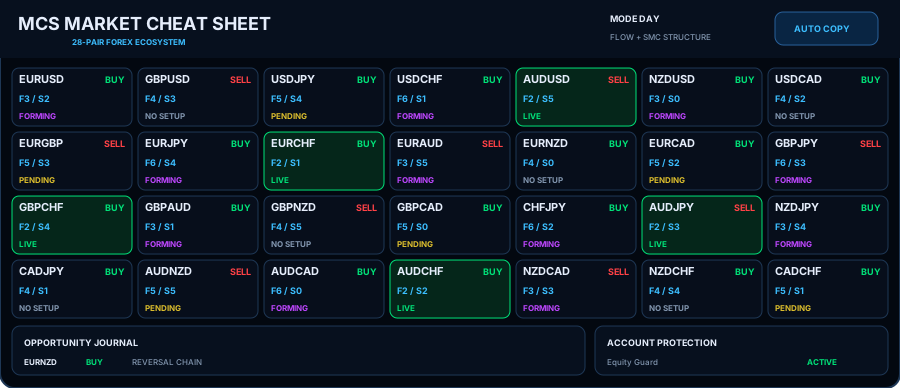
You do not need to read every number at once. The screen is just six main areas. Start with the big picture, then look at one pair card when you want more detail.
Your balance, equity, open P/L, margin and free margin. Think: “How is the account doing right now?”
The eight currencies are ranked from weak to strong. Rank 8 is strongest; rank 1 is weakest.
Each card is one Forex pair. It tells you the direction MCS sees and whether a setup is forming, waiting or live.
A simple performance summary for open trades and past periods such as today, week, month and year.
A quick view of profitable, losing and total open MCS P/L.
Server time, broker/server name and important MCS status information such as Prop Guard state.
Do not try to read all 28 cards at once. Pick one. Read it from top to bottom.
They are small “lights” that show which Smart Money events MCS currently detects. Green means that event is active.
| Light | Simple meaning |
|---|---|
| LQ | Liquidity activity is present. |
| SW | A sweep is detected. |
| BO | Break of Structure (BOS). |
| CH | Change of Character (CHOCH). |
| MS | Market Structure Shift (MSS). |
| FG | Fair Value Gap (FVG). |
| OB | Order Block condition. |
The price level MCS is waiting for, or the position entry when a trade is live.
The planned stop level. In the current MCS design, protection can be managed virtually by the EA.
The planned target level, calculated from the stop distance and the selected RiskReward value.